Showing posts with label Triton. Show all posts

Friday, July 08, 2011

Triton Player 1.3 : Themes are here

Another major update for Triton Player is here. Version 1.3.5.0 is out with the main attraction being the ability of themes. Currently we have the default Orange theme and a new theme called Minty Green.

Triton Player with Theme Minty Green
Along with a string of minor enhancements and bug fixes, we have changed the settings panel for themes and language under a new tab called other. There is an improvement in start up speed also.
Change Theme
The change log for this release is :
 Triton Player 1.3 [June 2011]
 - [CHANGED] SettingsManager redefined.
 - [CHANGED] Events Reordered.
 - [ADDED] Remember last played track no and position when the player is closed.
 - [ADDED] Update InfoView when a Track is added or removed.
 - [CHANGED] Playlist Track no updated when a track is removed.
 - [OPTIMIZED] Saving settings on Application Exit.
 - [CHANGED] Shuffling doesn't restart from the beginning with a new track.
 - [DROPPED] Reordering the playlist acting weierd, reorderTrack() function still available
  inside PlaylistManager.
 - [CHANGED] Styling of application.
 - [CHANGED] Properly positioned Close and Minimize buttons.
 - [ADDED] Themes!
 - [ADDED] ThemeManager to manage Themes.
 - [CHANGED] Settings read in preinitialize and runtime style loaded 
  before application is loaded.
 - [CHANGED] UI Layout.
 - [ADDED] States and transitions for UI.
 - [OPTIMIZED] Code for Compact Mode toggle.
 - [CHANGED] UI on PlaylistView.
 - [OPTIMIZED] Improved Startup Speed.
 - [ISSUE] Minor flicker on startup if in Compact mode.
 - [CHANGED] Language tab from SettingsPanel renamed to Other.
 - [ADDED] Option to chnage the theme from Settings Panel.
 - [REMOVED] Playlist Reorder codes.
 
 Triton Player 1.3 [July 2011]
 - [CHANGED] SelectionColor of playlist item updated when the theme is changed.
 - [CHANGED] Localization text for themes.
 - [CHANGED] SettingsPanel layout.
 - [CHANGED] Current theme and locale are pre-selected in SettingsPanel.
 - [CHANGED] Tracks added in Shuffled Mode are added to the original collection at the end.
 - [FIXED] Fixed minor null exceptions introduced with new features.
 - [CHANGED] Minimize To Tray is false by default.
 - [CHANGED] Fix for total time calculation in PlaylistView.

Download Triton Player 1.3 here (http://www.mediafire.com/?a7b3m6o7c2kah5e) [914kb]

Saturday, May 14, 2011

Triton Player 1.2

    Triton Player 1.2 is available for download now. This version is a recommended update and has massive performance improvements. 

Triton Player 1.2

    The major visible change is the much awaited addition of a SeekBar for the player. Some under the hood changes have also taken place which includes Storing the Settings in binary format from the previously used XML format for improved speed and performance. The core of the application, the ‘sndbarlib’ has been updated to version 1.1 with some performance optimizations. So what are you waiting for? Checkout the latest version now itself!

The full changelog for this release follows :

Triton Player 1.2 [May 2011]
 - [REMOVED] Logging platform as it seemed surplus.
 - [ADDED]     Save settings and default playlist on ALT + F4.
 - [CHANGED] Localization String in en_US updated.
 - [FIXED]      Null Pointer Exception fixed in PlaylistManager.
 - [ADDED]     Seekbar for player.
 - [CHANGED] Application settings stored as a binary file to speed up
                        startup time and increase performance.
 - [ADDED]     SeekBar functionality on Paused state.
 - [CHANGED] sndbarlib updated to 1.0.
  - [OPTIMIZED]    Several Code Optimizations.
 - [ISSUES]    Clicking on Seekbar position might not always doSeek properly.
 - [FIXED]      Mute icon was not toggling properly.
 - [OPTIMIZED]    Updating of TrackInfo on UI.
 - [CHANGED] sndbarlib updated to 1.1, with optimizations.
 - [OPTIMIZED]    Removed many unnecessary function calls.


Download Triton Player 1.2 here : (http://www.mediafire.com/?r1z8iea8hq217cy)

Sunday, February 20, 2011

Changes in TritonPlayer

We will have a look at the list of changes in Triton Player 1.1

Localization

Did you know that Triton Player supports German Language in addition to the default English? More localization strings have been added in this version. There was a bug that initially the default language was coming as null. It has been fixed.

Changes based on User Review

Some changes have been implemented from user responses. This includes the playing from the beginning if you switch to shuffle mode being changed to start playing only if any song is already playing. "Hide to tray" when minimized can now be controlled using the settings screen. This is an issue reported in Win 7 versions. By default "Hide to tray" is disabled.

UI Enhancements

On the UI end, we start displaying the File Loaded progress bar as soon as the user has selected a folder rather than once the first file was completed loading. This change should make the users seem the application is more responsive. Some minor UI tweaks also.

Performance Related

Some changes are in the internal workings for performance and following standards etc. This includes using an Item Renderer to display the playlist instead of manually creating.

Attempted Features

Reordering the playlist was partially implemented, but the track numbers were not updating properly. So that feature is still not implemented.

Whats in store

A feature that should be available on most normal players would be a "seek bar". If you noticed that the seek bar on TritonPlayer is not working , well we are working on it. Also lookout for themes in the future releases.

Saturday, February 19, 2011

Triton Player 1.1

An update to TritonPlayer has come. We are now in Version 1.1. Some features, enhancements and performance improvements have been added. Check out the changelog below.


Triton Player 1.1.x.x [Feb 2011]

- [ADDED] More localization strings in File / Directory Select.
- [FIXED] Setting of locale at startup.
- [CHANGED] AudioPlayer instance encapsulated in the PlaylistManager.
- [CHANGED] Using ItemRenderer for Playlist for improved performance.
- [CHANGED] Shuffling starts playing from the first track only if the player was already playing.
- [CHANGED] Default playlist stores unshuffled playlist even if it is shuffled when closing.
- [CHANGED] File Loading Progress bar is displayed as soon as the user has selected a folder
instead of when the first file was loaded.
- [ADDED] Added Application Logging Module.
- [CHANGED] Minor UI Enhancements.

Download From here (http://www.mediafire.com/?qdo21otdsr1id25)


Project Status

The following lists the status of my recent projects. A few of them are active as in features being added on and stuff, couple of them have been scrapped and a few ideas are in the pipeline :)

Adobe AIR Based Projects

Active Projects :

TritonPlayer (Mp3 player project) (v 1.1)
PNRStatusApp (PNR Status & Reservation Reminder) (v 1.4)
TimerApp (Basic Timer Application) (v 1.0)

Planned Projects

CryptX 6 (Encryption / Decryption Utility)
TheBrowser (HTML browser based in AIR, uses WebKit for rendering)

Scrapped Projects

ScreenGarbber (Take screen shot of desktop) (reused code into PNRStatusApp)
ReservationDateCalculator (Calculate date for advanced reservation) (implemented functionality in PNRStatusApp)
FlvPlayer (FlvPlayer) (Better apps already available)

Other Projects

Simple FFMPEG UI (UI for FFMPEG media converter) (v 0.6)


Monday, January 17, 2011

Triton Player 1.0

We have Triton Player 1.0!

In case you are wondering what this is all about, it is a small mp3 player project that I developed in my spare time while working on Adobe AIR. The player features playlists, visualizations, shuffle mode, compact mode to no name a few. A feature to update the current playing track on Twitter was in plans, but run into some technical difficulties.

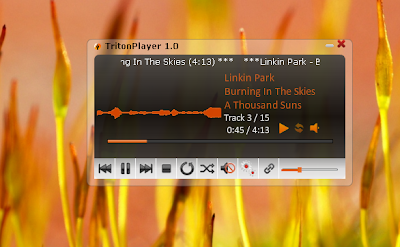
Below is a screen shot of the Compact Mode.


When minimized the player will hide from the task bar and an icon will be displayed in the system tray. Some of the options can be invoked from the system tray menu. When you mouse over the icon, it will show the current track name. Triton Player features 3 types of Visualizations that are based on the sound input from the currently playing file.

Here is a look at the maximized mode.


You can save the playlist as an mpl file which is nothing but a fancy XML file. The player will remember the last browsed directory and the playlist that was used when you start it again. We are working on adding a couple of features at the moment. Explore and find out more.

Check out the version 1.0 from here(Hosted at MediaFire).

P.S. You will need atleast Adobe Air 1.0 Runtime to install and use this player.

Monday, June 21, 2010

Introducing Triton Player

I am quite happy to introduce Triton Player, the current project that i am working on. This will be an extension of the eMplayer that was done with HTA technology using Javascript and some C code some time back. This time, the development is taking flight using Adobe AIR Technology. The most important feature that I am trying to add is Twitter integration using OAuth.


The logo for the application has been designed using Illustrator and Fireworks. The logo features a Trident with supposedly sound waves emanating from it. A sample UI Screenshot of the application's current state on my desktop is given below.
I am unable to say whether like eMplayer that this project will also come ot of Beta or if ever it would be complete. So this project would mostly be a non-release-to-public project. Lot of features are planned but i still have no idea about the completion of this one.