Showing posts with label Technology. Show all posts

Wednesday, November 26, 2014

Random Contact with Material Design Love

It's been a while since my last blog post, I was obviously busy with my job, life and other important things. In between Android released the latest SDK and support libraries for taking material design to lower versions.

I have been slowly looking at the latest APIs and how to use them in my spare time. Once I was able to get hold of the latest SDK as well as Android Studio, I started to see how I could redesign some apps based on material design principles.

Random Contact 2.2
After doing a sample project that made use of all the new features, I started working on redesigning Random Contact app. Firstly this is a simple app, not too complicated in terms of features as well as low volume of users. Second of all, this app has not been updated in a long while. So a little love was on the cards.

Take a look at the new design below.
It will be interesting to note that the action bar and some text color change dynamically based on your contact's profile image. This is made possible due to a library called Palette which is part of Android. On a technical side, this app uses the following new features from Android.

  • Recycler View
  • Toolbar
  • Card View
  • Palette
This app represents a fresh UI design with material design principles in mind. You can find the app at the link below. Try it and let me know your feedback.

https://play.google.com/store/apps/details?id=com.ae.apps.randomcontact

The source code for the app is available at github - https://github.com/midhunhk/random-contact

Thursday, December 12, 2013

Disable Dashboard on Start Up in Spring Tool Suite


If you are a new user to the Eclipse based IDE Spring Tool Suite (STS). If like me, you are getting annoyed when the Dashboard opens up every time the application is started, this is how you can disable it.

After some research and some searching through the preferences, I finally found out how to get it done on the latest version of STS (3.4.0 the one I am using now). Apparently they moved this around from previous versions.

In the STS application, navigate to "Window -> Preferences", and start typing "Dash" inside the text box located at the top left. Click on the "Dashboard" item and uncheck the "Show DashBoard On Startup" item on the right. Click "Apply" and "OK".

You can look at the above image to see how the preference screen for this will look like. Once done, the DashBoard should be gone for ever, unless you want it back in which case you can bring it back by checking the same option in the Preference.


Wednesday, October 16, 2013

Tips on Improving Productivity with Eclipse


For many tasks Eclipse IDE provides a key board shortcut of some type. When working with medium to large projects, I find using keyboard shortcuts to be a significant time saver. They let me find or get things done very fast. Compared to using a menu option or using the mouse, key board shortcuts can improve one's productivity.

ShortCutWhat it Does
F3Open Declaration
CTRL + SPACEAuto Complete
CTRL + DDelete current Line
CTRL + GSearch for declaration in Workspace (after highligting a word)
CTRL + LJump to Line Number
CTRL + OQuick Code Outline/ Structure
CTRL + TOpen Heirarchy
CTRL + ESwicth Editor
CTRL + QLast Edit Location
CTRL + SHIFT + ROpen Resource
CTRL + SHIFT + IInspect (Evaluate an expression while in debug mode)
CTRL + SHIFT + PFind matching brace
CTRL + SHIFT + LKey Assist

Bonus Tip
Double clicking to the immediate right of an opening brace selects all the code between two braces.

Feel free to add any more shortcuts in the comments.

Friday, June 28, 2013

Bing Image Parser

How many people have noticed the different images that are displayed on the home page of the search engine Bing? I used to visit the Bing homepage just to check the image each day. As an aside you can get some trivia on the US version of the site.


It was then that I had an idea to see if there was a way to automate the way to see different images that are provided by Bing. After a search, done ironically, on well "Google" (Searching on Google is like second nature for me), I was able to get an RSS feed URL for the Bing images, and able to parse it using a small Java application.

The reason behind choosing a source which gives data as RSS is that it is a standard. What the core of this application does is parse an RSS Feed. The other functionality like console, ability to save image and other settings are built around this core. So essentially this can be reused to parse other RSS Feeds.
The UI is not very fancy, it is a invoked via command line and there is a windows shell script that can be used to run it easily. (Make sure you have Java runtime installed). If you don't want the source code, you can grab a build file (zip file with the application and shell script file) from GitHub.

After getting the build file, extract it to a folder, edit the "settings.properties" file and run the "run-biotd.cmd" file. If you are opting to save the images to disk, make sure that the folder specified exists.


The entire eclipse project is now available at GitHub and licensed under the "Apache License Version 2.0" at the link below.
https://github.com/midhunhk/the-bing-image-of-the-day-parser

Build no 0.4.5 is available at
https://github.com/midhunhk/the-bing-image-of-the-day-parser/blob/master/BIotD/builds/BIotD_0.4.5.zip

Make sure to check these out and watch out for future updates. You can use this source code to parse any other RSS feed response and make an awesome app, so don't wait up.

Saturday, June 22, 2013

Mobile App vs Desktop application Development

The app development and release cycle for mobile (or tablet) and desktop applications differ vastly.

A desktop application is expected to be feature complete at the time of launch and may have undergone years of development (in the case of large applications like an Office Suite) before a major version is released. Only minor fixes for bug and security are expected till the next major release.Unless it is a major security related update, most of the time I ignore application updates for my desktop applications. This is because if there is no change in user experience or performance, it doesn’t seem work to go over the procedure of doing an update (A system restart for some applications if on Windows adds to this misery). I keep my graphics driver software up to date without seeing any significant performance improvements.

On the other hand, most users expect their mobile apps to get regular updates. It has sort of become a norm. This could be an addition of a new feature, improvement in user experience or a bug fix. Updating an app is seamless and there is little or no data loss and you can start using the updated app as soon as it is updated.

So while developing a mobile app, in my view, it is important to launch the first version with the most important and basic features that an app is concentrating. And add additional features upon each updates in short cycles. This would keep give the users a feeling that the app developer is constantly developing the app on improving the user experience. Most importantly this would keep the app fresh. If it stops evolving, users might get bored and may try out another app.

The advantages of this kind of release cycle are that the developers can get feedback from the users early and take into account feature suggestions or changes.

It should, however be noted that these views may not apply to all scenarios, there are exceptions. For e.g.: there is no scope or need for a short release cycles in the case of an app like Calculator.Desktop browsers like Google Chrome and Firefox have short release cycles, although there may be some minor change in a version.


To conclude, the approach for mobile app development is different from that followed for conventional software releases. This should be researched from a marketing as well as technical stand point before being finalized.

Tuesday, April 12, 2011

Cryptx 6


Finally, the most awaited Adobe AIR based development project is about to get released. The latest version of CryptX will be 6 superceding the HTA and C++ based 5.1 Beta. Yes, the last version never broke from the Beta label. It was made as a Proof Of Concept that such an encryption decryption utility could be made, after encryption algorithm security problems from CryptX 4.

CryptX 6 like its predecessor will be using 128 bit AES encryption. Check out some of the features of CryptX 6.

  • 128-bit AES Encryption.
  • Password used for encryption is not stored in the encrypted file.
  • Completely written using Action Script 3 and uses as3crypto library.
  • Intuitive UI.
  • Desktop integration with Encrypted file.
  • Using Green Threads for multitasking support in AS3.
  • Improved performance from previous versions.
  • Logging Platform support.

Please note that the CryptX 6 does not support file formats from previous versions.

More info to follow

Monday, January 17, 2011

Triton Player 1.0

We have Triton Player 1.0!

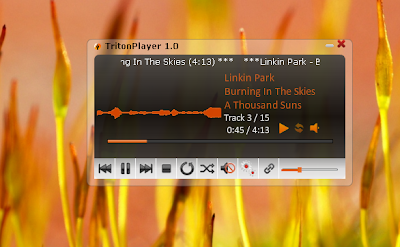
In case you are wondering what this is all about, it is a small mp3 player project that I developed in my spare time while working on Adobe AIR. The player features playlists, visualizations, shuffle mode, compact mode to no name a few. A feature to update the current playing track on Twitter was in plans, but run into some technical difficulties.

Below is a screen shot of the Compact Mode.


When minimized the player will hide from the task bar and an icon will be displayed in the system tray. Some of the options can be invoked from the system tray menu. When you mouse over the icon, it will show the current track name. Triton Player features 3 types of Visualizations that are based on the sound input from the currently playing file.

Here is a look at the maximized mode.


You can save the playlist as an mpl file which is nothing but a fancy XML file. The player will remember the last browsed directory and the playlist that was used when you start it again. We are working on adding a couple of features at the moment. Explore and find out more.

Check out the version 1.0 from here(Hosted at MediaFire).

P.S. You will need atleast Adobe Air 1.0 Runtime to install and use this player.

Friday, December 03, 2010

Hidden Snake Game on YouTube

Don't know if any of you guys already know this, but there is a hidden Snake Game on th e YouTube player. How to play it? Follow these steps :

1. Open a youtube Video

2. Hold left button of muse + left arrow on keyboard + top arrow on keyboard

Thats it!

If you hit the sides of the video, the game will be over.

Monday, June 21, 2010

Introducing Triton Player

I am quite happy to introduce Triton Player, the current project that i am working on. This will be an extension of the eMplayer that was done with HTA technology using Javascript and some C code some time back. This time, the development is taking flight using Adobe AIR Technology. The most important feature that I am trying to add is Twitter integration using OAuth.


The logo for the application has been designed using Illustrator and Fireworks. The logo features a Trident with supposedly sound waves emanating from it. A sample UI Screenshot of the application's current state on my desktop is given below.
I am unable to say whether like eMplayer that this project will also come ot of Beta or if ever it would be complete. So this project would mostly be a non-release-to-public project. Lot of features are planned but i still have no idea about the completion of this one.

Saturday, May 01, 2010

Revamp in order

Over the past one and a half years, my life, perspectives, likes, dislikes and even thoughts have come leaps and bounds. So i believe a quick revamp is in need for my blog also. Feel free to comment me on the changes that you see.

This will be my 49th post. Incidentally it is a number mostly associated with my favorite football club that is arsenal. Arsenal had gone 49 consecutive Premiere League games unbeaten from 2003 to 2005 - a national record. Speaking of arsenal, i have become infected with Arsenalitis it seems. It has become a part of my blood, thoughts and life. So this 49th post is dedicated to the team that plays the best football in all the land :)

I was able to buy a sony cyber shot camera last year and have been experimenting with my photography interests for some time now. Most of my better efforts have been uploaded in mu Orkut and Facebook albums.

Opera has come out with version 10 and i had been following all the great developments from them all throughout. I use Opera mini 5 from my mobile device and it is an absolutely wonderful product. Fantastic UI design, navigation and exceptional usability makes me think that Opera have done it this time. What more can they do to improve. Will have to wait and see.

Will post more soon, chow

Friday, December 05, 2008

Opera 10 alpha

   Opera has just come out with the alpha release to Opera 10 web browser, just a week after launching Opera Mini 4.2.

Check it out from here : http://www.opera.com/browser/next/

The New features are :

  • Updated engine : Opera Presto 2.2 is the newest rendering engine for the Opera browser. It provides significant improvements in speed, performance and security.
  • 30% Faster on the real Web : The optimized Opera Presto 2.2 engine performs much faster on resource intensive pages such as Gmail and Facebook.
  • Great-looking standards : With an Acid3 100/100 score, Web Fonts support, RGBA/HSLA color and SVG improvements, Opera 10 alpha is ready for the next generation of Web applications. 

Check the acid3 tests from here.

The other features are :

  • Inline spell-check : Opera 10 alpha underlines any misspelled words so you can express yourself without reservation.
  • Auto-update : Opera 10 alpha makes it easier than ever to stay up to date with the latest version.
  • Web Fonts and SVG : Typography on the Web will never look the same. With the Opera Presto 2.2 engine, Web Fonts can be used -including SVG font files.
  • Opacity through RGBA and HSLA : Transparency is the new black. In Opera Presto 2.2 it is easier to make page elements transparent, with the addition of an alpha transparency argument to the RGB and HSL color models.
  • Opera Dragonfly evolved : Opera Dragonfly is now even better for debugging Web sites and allows the editing of the DOM and inspection of  HTTP headers.

Opera 10 final is expected to arrive in the first half of 2009.


Monday, November 17, 2008

Adobe Fireworks CS 4 Review


As a long time user and fan of Macromedia Fireworks, it was heart shattering when Adobe took over Macromedia. And Fireworks was not given much importance in the CS3 Suite. Not so much stuff new in that except the installer was like 500mb and except from some minor changes not worth it. So I wondered if its future was doomed and overshadowed by the likes of Photoshop and Illustrator. Recently I got hold of the Fireworks CS4 demo and simply fell in love after using it. I will just note down the important features I like and those that enhance usability of this marvelous software.

The reason I loved FW so much is its inherent simplicity in using and the great features and flexibility it provides for a “Web Designer” and small time “Graphics Designer” like me. Photoshop is the best software for Photo editing and major graphics works, but almost awful when it comes to neat web designing from my point of view.

Fireworks CS4 has had a great deal of overhauling done to sharpen up the usability. A major point of notice is the welcome change in the Interface. More workspace can be coughed out and we can customize and save the layout. The right side panels are very flexible in that they have a minimum mode showing only the icons or an expanded with the description of the panel as well. They have taken out the title bar altogether. The menu bar is at the very top with a lot of useful items shown as small icons below it, including the new, save, open, undo, redo, cut, copy, paste, group, ungroup, join , arrange items, align items and rotate. These can be easily accessed now. Earlier either we had to use the menu system or learn complex shortcuts.

Another welcome improvement is the smart guides, which were already available in Flash 8 for aligning items on the stage.

A Take Screenshot command enables to take a screen shot which is a pretty useful feature. The attributes like custom styles applied to an object can be copied and applied on another object by using the “Paste attributes” option. Really neat stuff.

Projects can be prototyped easily by either using the “Demo Current Document”, in which a simple slideshow of the completed document can be shared and gathered feedback on. The other option is the capability to directly export in PDF from within fireworks. This can also be used for sharing the design with clients or colleagues and get back feedbacks. The export PDF option has a number of options. You can even export with password protection.

A host of vector drawing functionalities have been added in Fireworks CS4. Type rendering engine has undergone considerable improvements. Along with the 9 slice scaling tool, there are a lot of useful commands added in the command menu. Support for Adobe AIR and the ability to create flash based slide shows from within Fireworks are handy.

Overall I have to say I am impressed. There are a lot of options for a Web Designer and the development phase can be speeded up. The use of rapid prototyping in case of a web site or an AIR application can cut development times by a large amount. So we clearly have Fireworks in the right path. It should definitely be in the arsenal of a serious web developer.

Tuesday, July 29, 2008

Cryptx 5 Beta 1 Release

   Cryptx 5 development has come massive distances after the project almost got scrapped due to various problems faced during development. Although there are minor flaws in it, we are happy to release it as a Beta 1 so that developers from around the world can help make this project better.

the download link for the CR5-B1 is as follows : 

http://www.mediafire.com/?d5n7331z40y

Screen shot
-------------

   Please understand that this release is not fully complete and has some bugs and problems in it. Some known issues are

* No Help included

* Encryption writes log incorrectly

* Decryption does not write a log

* Need to optimise code for execution pipelines

* command line arguments might be needed to be formatted again

* encrypted file size is larger than original or decrypted file.

Features that are already there include :
-----------------------------------------------

* Rich HTA based GUI

* Work History denoting the various steps that went through the development of the project

* CTimer class to follow time taken for processing the data.

* AES 128 bit encryption

* Encrypted data is stored as HEX for added protection.

* Password is not stored in the encrypted file, only a hashed string. (MD5 can be implemented easily for extra protection of the pasword. It can be done from within the HTA interface).

Updates available at : http://www.cryptx5.co.nr

Hoping for some favourable reply ....


Thursday, July 24, 2008

Artistik Expressionz on Eniac '08

    Eniac '08 is a national level technical symposium being organised by the Electrical & Electronics department of Govt. Rajiv Gandhi Institute of Technology, Kottayam.

   Ae got the opportunity for designing the poster, brochure,flex, website and logo for the event. Most of the work is completed by now.

  For further information go to http://www.eniac08.com

Check back for updated info.

Calculate File size with C++

Programming .....

  The following is a C++ program to calculate file size of a file. It has been tested to correctly report file sizes upto 4Gb, ofcourse used 32 bit compiler!

--Begin--

/* getFileSize.cpp
 * Gets the file size of a DiskFile
 *
 * Midhun Hk (Centrum inc Software Solutions)
 * July 2008
 * $ v 0.1
 **/

# inculde <ifstream>
# include <iostream>

void main()
{
    ifstream is;
    unsigned long fileSize = 0L;

    is.open("FileName.bin");   // Open the file
    if(is.good())                    // If file is opened successfully
    {
           // calculate FileSize
           is.seekg(0,ios::end); // move 0 bytes from end
           fileSize = is.tellg();   // get offset
           is.seekg(0,ios::beg); // rewind
     }

      cout<<"File Size is : "<<fileSize<<:" bytes";
}

--End--

Hope this has been useful.

Saturday, May 24, 2008

FileSplitter 1.9 Beta - Download with Source

     Here is another completed project from us. Its called File Splitter and basically designed to split a large file into a number of smaller parts and to be able to rejoin them. Ofcourse you may not readily feel any need for such an application, but the point here is that it can be done and the project is Open Source and so everyone can learn from it.

   To have a look at the main features, look at the promotional poster given below :


The interface is done with the HTA technology which will be discussed here soon.

File Name : FileSplitter_1.9.zip (415.19 KB)
Download link : http://www.mediafire.com/?un2zjr3oz9m

Thursday, May 15, 2008

Audio Steganography Application with Source Code

Ok, as i had promised earlier, here is the working part of the Audio Steganography Application done in Java. The Source code is also included in this package. As there is very little time, i cant explain the complete working here soon. So if there are any doubts, im happy to explain that portion...

So heres the link for download :

http://www.mediafire.com/download.php?m4ktmdhdnnj 


Hope this is useful. Also included are complete documentation and the source code in Java.


Edit :


The above link is no longer available.


Please refer to the following links :
http://midhunhk.blogspot.com/2011/10/audiosteganography-info.html
and
http://midhunhk.blogspot.com/2011/08/faq-regarding-audiosteganography-app.html

Monday, May 12, 2008

Intel Atom Processor


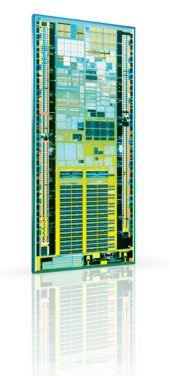
Heres a look at the Atom Processor :

Intel Announces Intel® Atom™ Brand for New Family of Low-Power Processors

     The Intel® Atom™ processor will be the name for a new family of low-power processors designed specifically for mobile Internet devices (MIDs) and a new class of simple and affordable Internet-centric computers arriving later this year. Together, these new market segments represent a significant new opportunity to grow the overall market for Intel silicon, using the Intel Atom processor as the foundation. The company also announced the Intel® Centrino® Atom™ processor technology brand for MID platforms, consisting of multiple chips that enable the best Internet experience in a pocketable device.


     The Intel Atom processor is based on an entirely new microarchitecture designed specifically for small devices and low power, while maintaining the Intel® Core™ 2 Duo instruction set compatibility consumers are accustomed to when using a standard PC and the Internet. The design also includes support for multiple threads for better performance and increased system responsiveness. All of this on a chip that measures less than 25 mm², making it Intel's smallest and lowest power processor yet.1 Up to 11 Intel Atom processor die -- the tiny slivers of silicon packed with 47 million transistors each -- would fit in an area the size of an American penny.

     These new chips, previously codenamed Silverthorne and Diamondville, will be manufactured on Intel's industry-leading 45nm process with hi-k metal gate technology. The chips have a thermal design power (TDP) specification in 0.6-2.5 watt range and scale to 1.8GHz speeds depending on customer need. By comparison, today's mainstream mobile Core 2 Duo processors have a TDP in the 35-watt range.

    Intel said the Intel Atom processor also has potential for future revenue opportunities in consumer electronic devices, embedded applications and thin clients.

    Official Source : http://www.intel.com/pressroom/archive/releases/20080302comp.htm

Monday, March 10, 2008

CryptX 5 :: Class Structures revision 0.1.0.2

   Heres the newly revised specification for the class structures for the Open Source encryption software project codenamed SideLiner. Although not much input from the community, i was able to think out some more solutions for possible problems in the structure when implementing 
in C# or Java in later development life of the project.

The changes include :
1. Working around the MI (Multiple Inheritance) problem in C# and Java. 
2. Making the class structure more understandable. 
3. Made the "DiskFile" class abstract. 
4. Added ae watermark in the specification.

So expecting more help from the community out there.