Showing posts with label project. Show all posts

Sunday, June 08, 2014

RoundedImageView in Android


The contact picture as it appears in Google+ inside a circle was part of the redesigned Random Contact app at the play store.

The solution was to create a custom View "RoundedImageView". Developed with help from stackoverlow.com, the custom view is released as an open source component that anyone can reuse.

RoundedImageView usd in Random Contact app
The RoundedImageView extends android.widget.ImageView and basically applies a circular mask over the image by overriding the onDraw() method.

This file is a part of the ae-apps-library project.

Source for RoundedImageView at https://github.com/midhunhk/ae-apps-library/blob/master/library/AeAppsLibrary/src/com/ae/apps/common/views/RoundedImageView.java

Saturday, May 24, 2014

PNR Status App

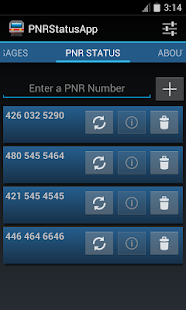
Finally the PNR Status App for Android was released on the Google Play Store a few weeks back. The latest version is 3.2 codenamed Marvin.

Don't worry about keeping track of your PNR Number or enter it each time you want to check the status. Use this app to store your PNR Number and check the status easily.
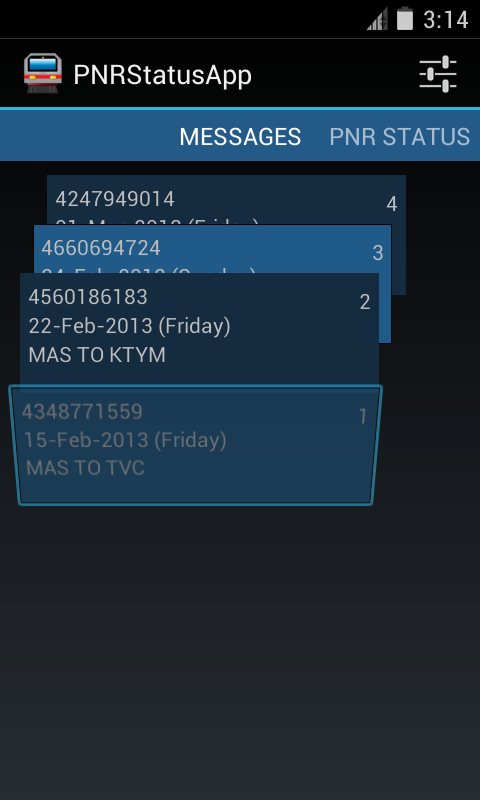
You can see a sorted list of ticket message details sent as confirmation for easily accessing your booking information.

Features:
- Follows Android Design principles
- High quality graphics and icon
- Multiple services to choose from
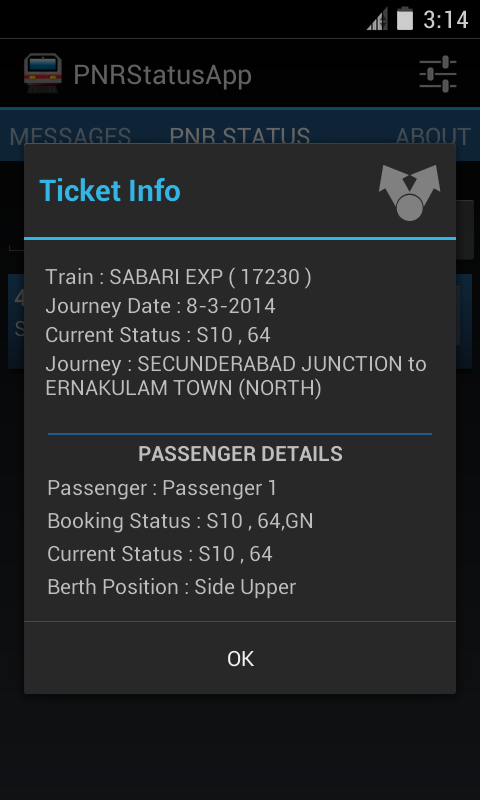
- Detailed PNR information
- Shows ticket information from IRCTC's SMS
- No Advertisments
- Free
- Open Source

Screenshots


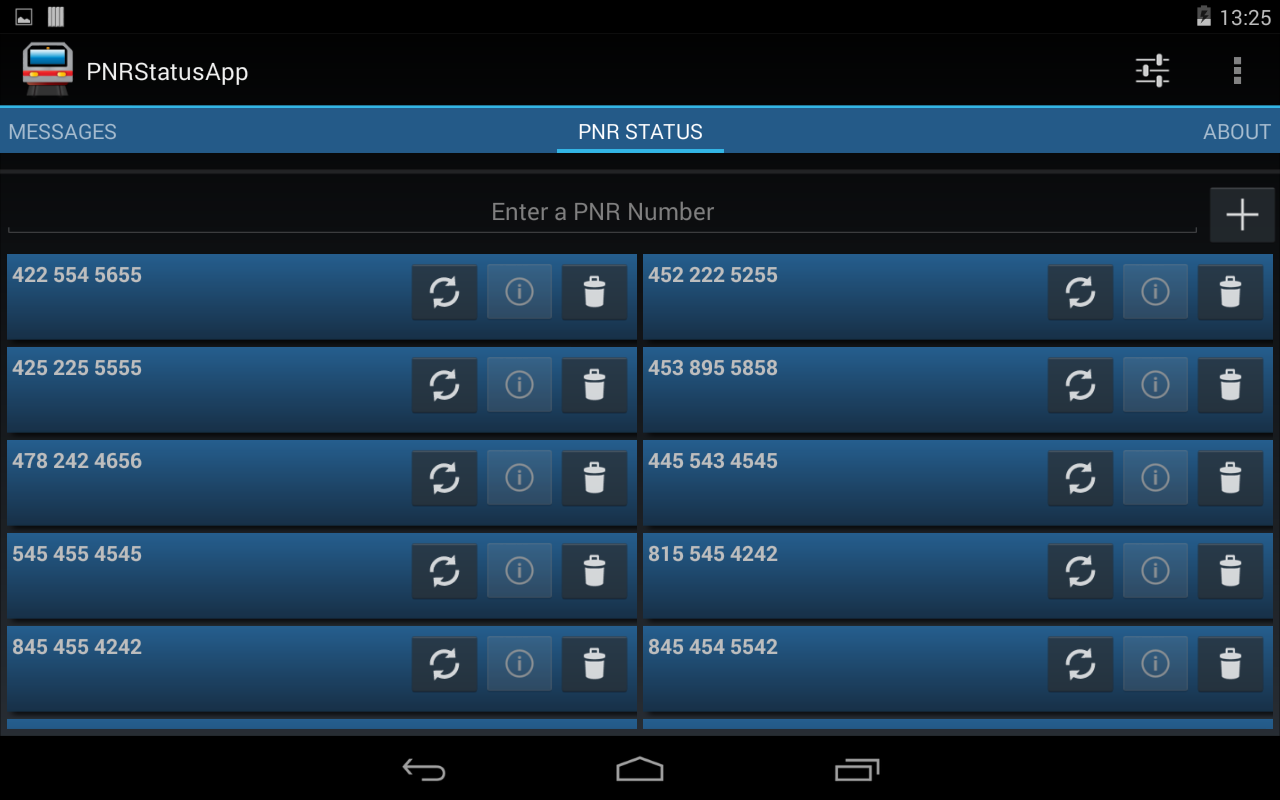
Did I mention that this app is designed for tablets as well?

On a 7 Inch Tablet


This application is open source and free to use. The source code can be found at the following GitHub location. https://github.com/midhunhk/pnrstatusapp . Feel free to browse and

Find out more app details from https://www.facebook.com/AeAppLabs
Play Store Link: https://play.google.com/store/apps/details?id=com.ae.apps.pnrstatus.v3

Friday, January 17, 2014

Retracing the travel in Dan Brown's Inferno - Part 1


While reading Dan Brown's novel Inferno, I had the habit of checking the places and locations mentioned in the novel as the characters traveled around the beautiful city of Florence.

Having played Assassins Creed 2, which is also set in Florence reminded me of places that I had seen and ran (albeit, set centuries ago).

After completing the book, I learned about the Google Map Engine. An app where we can create custom maps. So I began this project of marking the places in the order that the characters took.

Because of time constraints and other commitments, I couldn't complete and share the Part 1 soon enough. Anyways, better late than never.

Part 1 of this project is completed and shared below. Have a look at it if you intend to read it. I will continue to work on Part 2.


https://mapsengine.google.com/map/edit?authuser=0&hl=en&mid=zqsMFuWb0NmE.koenj4cBUSA4

Thursday, November 21, 2013

Design evolution of Random Contact app

Background
Just this week I published an app on Google Play Store called Random Contact. It all started when I was learning the Android Contacts API. I wanted to make an app myself that made use of the Contacts API so that I could learn and see it working in a real environment. Especially as I had a Google Nexus S, it was even more an incentive to develop and experiment my own apps and see them running on my phone.

Random Contact
So that was the reason for developing this app. There seemed no point in making another contacts app as the stock(default) one was very good and many third party apps available. So I thought of making an app that shows a random contact details. It has a surprise element to it.

Warning: This app is not meant to be a replacement for your Contacts / Dialer app. This is a fun app with no real use. The main reason this app is considered as part of "Useless Apps" internally.

The development started with an old version of Android API (2.2 to be precise), so I wasn't keeping in mind the latest design guidelines and the result was an ugly looking app with very little user experience

Redesign and Rewrite
After the Holo design came out solid Android Design guidelines became the De-facto standard, I went about researching on how to create a better User experience (UX) keeping in mind that this app has no special value to a user.

After going through brainstorming and multiple drawings on paper, came up with the new design. And in keeping with the time, rewrote most of the code against Android 4.3 APIs and is now available on the Play Store. Along the way some optimizations and new features were added.

Few people might have seen the original app, so below you can find a screen shot of initial screen, design on paper and the present day app.

Left : First version, Middle : redesign on paper, Right : Completely redesigned UI


Apps Library
I will touch on this in a future post, but one of the side effects of development this app was an Android library app that I created which makes use of mostly my research and studies. This will be an ever growing library which is open sourced and publicly available on GitHub. Any new Android projects can make use of this library to achieve similar functionality.

Try out the app
So if you are still interested in checking out this app, follow the link below to get it from the Play Store.
Get it on Google Play

Wednesday, November 06, 2013

RandomContact - New App Announcement


After being in an internal Proof of Concept project, one more Android app will soon be seen by the external world. I was learning to work with the ContactsContacts API. This API is a contract between the Contacts provider and applications.


Most of the code related to accessing the API is done as part of a library project called aeappslibrary, the code for which is open source and already available in GitHub. This library can be reused by other projects to work with the API. There have been hours spent on studying the API while developing this library. MessageCounter is an application that already utilizes this library.

It was near the end of 2012 that I started learning about the Android's ContactContract API. In order to learn the various parts of the API, I decided to create an Android App. That turned out to be a simple app called Random Contact. The UI was very basic and not very attractive - the sole reason it has lived its life as an internal app.

The Random Contact application shows you a Contact randomly picked from your contacts list. It will list all the contact numbers and easily allow you to call or text them. Other details that we can get using the API are the times that person has been contacted and the last date of contact. While you may think these features as boring, we think there could be fun uses.

When can you see the app live? Work on version 2, a completely redesigned version, is on steroids for the past few days. As much as the challenges are exciting, I shall provide here, for the first time, an internal road map for any app's development. A Beta release on Google Play is not too distant as of now.


The source code for this app is expected to be released under Apache Licence Version 2.0 on GitHub.

With the supported features as explained earlier, I would appreciate to see some rough drawings on how you expect the UX for the app.

Wednesday, October 16, 2013

Tips on Improving Productivity with Eclipse


For many tasks Eclipse IDE provides a key board shortcut of some type. When working with medium to large projects, I find using keyboard shortcuts to be a significant time saver. They let me find or get things done very fast. Compared to using a menu option or using the mouse, key board shortcuts can improve one's productivity.

ShortCutWhat it Does
F3Open Declaration
CTRL + SPACEAuto Complete
CTRL + DDelete current Line
CTRL + GSearch for declaration in Workspace (after highligting a word)
CTRL + LJump to Line Number
CTRL + OQuick Code Outline/ Structure
CTRL + TOpen Heirarchy
CTRL + ESwicth Editor
CTRL + QLast Edit Location
CTRL + SHIFT + ROpen Resource
CTRL + SHIFT + IInspect (Evaluate an expression while in debug mode)
CTRL + SHIFT + PFind matching brace
CTRL + SHIFT + LKey Assist

Bonus Tip
Double clicking to the immediate right of an opening brace selects all the code between two braces.

Feel free to add any more shortcuts in the comments.

Friday, June 28, 2013

Bing Image Parser

How many people have noticed the different images that are displayed on the home page of the search engine Bing? I used to visit the Bing homepage just to check the image each day. As an aside you can get some trivia on the US version of the site.


It was then that I had an idea to see if there was a way to automate the way to see different images that are provided by Bing. After a search, done ironically, on well "Google" (Searching on Google is like second nature for me), I was able to get an RSS feed URL for the Bing images, and able to parse it using a small Java application.

The reason behind choosing a source which gives data as RSS is that it is a standard. What the core of this application does is parse an RSS Feed. The other functionality like console, ability to save image and other settings are built around this core. So essentially this can be reused to parse other RSS Feeds.
The UI is not very fancy, it is a invoked via command line and there is a windows shell script that can be used to run it easily. (Make sure you have Java runtime installed). If you don't want the source code, you can grab a build file (zip file with the application and shell script file) from GitHub.

After getting the build file, extract it to a folder, edit the "settings.properties" file and run the "run-biotd.cmd" file. If you are opting to save the images to disk, make sure that the folder specified exists.


The entire eclipse project is now available at GitHub and licensed under the "Apache License Version 2.0" at the link below.
https://github.com/midhunhk/the-bing-image-of-the-day-parser

Build no 0.4.5 is available at
https://github.com/midhunhk/the-bing-image-of-the-day-parser/blob/master/BIotD/builds/BIotD_0.4.5.zip

Make sure to check these out and watch out for future updates. You can use this source code to parse any other RSS feed response and make an awesome app, so don't wait up.

Friday, November 23, 2012

PNRStatusApp v3 (for Android)

And thus the long awaited major update to PNRStatusApp (for Android) is nearly here. In the midst of very hectic work schedule, with new features and a new look the version 3 is almost completed. However taking advantage of the latest APIs (Application Programming Interfaces) provided by the Android platform, this version is only supported from Android Honeycomb (3.0) and above. The old version supported from Android Froyo (2.2) and above.


The newest feature added is the ability to search the message inbox for messages from IRCTC regarding booked tickets and displaying detailed information. This part still requires some more tweaking on.


The Messages are displayed in a 'StackView' that lets the user scroll through the list of messages.

More information coming soon...

Sunday, June 17, 2012

PNRStatusApp for Android

    The PNRStatusApp for Android, which was not working because of broken Service Providers interface has been fixed. The app is still not available in the Google Play Store and is under Alpha testing phase. Following are some screen shots of the app in action.


Home Screen to add PNRNumbers


Detailed Status of the PNRNumber


About the App Screen

As mentioned in the About screen, this application does not store any information retrieved about the PNR number and also is not commercial in nature.

This application is a part of self learning to the Android Application development. The following details were explored in this application.

  • Skinning applications, buttons etc
  • Custom Adapter for a List View
  • Calling a web service and parsing the response
  • Check if Internet connection is available
  • Moving between activities
  • Passing custom objects between activities
  • Sharing content
  • Different layouts used in Android (and how to optimally use them)
That's a good number of features to learn using a simple application. 

Sunday, October 09, 2011

Information on Audio Steganography

    In the following post, I am giving some guidelines and info about the Final Year Project that I did for my Engineering course. The information provided here is solely intended for educational purposes.

    What is Steaganography? Simply put, it is the art and science of writing hidden messages in such a way that no one, apart from the sender and intended recipient, suspects the existence of the message. Its like passing secret information right under people's noses, but no one has a clue that it contains secret information. This is unlike an encrypted file / information where people can suspect that there is a secret information.

    Anyway, there is a long history and types of Steganography that you can get from following this wikipedia link. What I am going to concentrate is hiding an encrypted file inside an audio file (*.wav). We have chosen wave format because of its simplicity and its simple structure and is based on the RIFF File Format. Why not use MP3, you may have a question? We need the Source audio file to be large enough to accomodate the encrypted contents of the file that we are going to hide and I haven't researched it, any licensing issues for using MP3 format.

    First of all, get a hold of the WAV file format specifications. The WAVE file header is 44 bytes long. You should not modify any data here, because if you do, the file will become unusable (i.e; cannot be played back in a media player software). 

   Since we decided to use the Java Programming Language to implement this, you would like to look into ByteArrayOutputStream, and byte Arrays to have access to each lower level bit of the files that you would be dealing with. So read the source file into a byte array, skip the header part, (44 bytes). Using an LSB replacement algorithm, we will add our data to this file.

LSB Audio Steganography Method


     What happens is we will replace the 2 least significant bits of each byte of the source file with bits from our secret message. You also need a method to know how much data you have to read back. You can use a marker text at the end, or keep the length of the message at the beginning which is what we did. The reason for changing the LSB is that, since they are the Least Significant (duh!), a listener cannot detect that much loss in information about the file.

    As stated in the FAQ,  I cannot post the source code for my project. I guess I have explained what goes on in a short post. You can figure out how to do all these with some simple Google Searches. I would suggest using the Eclipse IDE for development, splitting the project into a number of classes in nice packages :) and add any other features that you can think of. The complex part is encoding the message, and that will be just a few lines of code. 

    We had a user management module with a database for managing users, a log writer module for writing out a log, some extra UI libraries to make the app look unlike a java project, encrypt the message using any Encryption algorithm etc...

Sunday, August 14, 2011

PNRStatus App 1.6

The next update to PNRStatusApp is here. Some minor changes in layout, UI elements and the addition of StatusHistory to keep track of all the statuses of a ticket that you have checked.

Redesigned Main State

Status Histories


You can access the download link at the end of this page.

Changelog :
PNR Status App 1.6 [Aug 2011]
- [CHANGED] PNRInfoRenderer Layout and UI.
- [ADDED] Button to copy the PnrNumber to the clipboard.
- [CHANGED] PNRInfo List not updated when a note is added / updated.
- [CHANGED] PNRNo is not editable in the PNRInfoRenderer.
- [ADDED] Each time a PNR Status is checked, it is stored in StatusHistory.
- [ADDED] Last successful Status is displayed on startup.
- [ADDED] StatusHistoryWindow lists all the StatusHistory of a PNRNumber.
- [FIXED] Bug while reading back StatusHistory items.
- [ADDED] Added option to clear StatusHistories.
- [ADDED] Info Message if More Info clicked without checking the PNRStatus.
- [ADDED] Style for PNRRow based on the last check.
- [FIXED] Bug of Booking status text also getting updated when the note is updated.
- [CHANGED] Removed the StatusBar.
- [FIXED] Bug in PNRNumber equals method.
- [FIXED] Bug in check for duplicate PNRNumber.
- [ADDED] Alert is shown if trying to add a PNRNumber that already exists.


Download from here (http://www.mediafire.com/?3miq5dfjzrwjuuq)

Friday, July 08, 2011

Triton Player 1.3 : Themes are here

Another major update for Triton Player is here. Version 1.3.5.0 is out with the main attraction being the ability of themes. Currently we have the default Orange theme and a new theme called Minty Green.

Triton Player with Theme Minty Green
Along with a string of minor enhancements and bug fixes, we have changed the settings panel for themes and language under a new tab called other. There is an improvement in start up speed also.
Change Theme
The change log for this release is :
 Triton Player 1.3 [June 2011]
 - [CHANGED] SettingsManager redefined.
 - [CHANGED] Events Reordered.
 - [ADDED] Remember last played track no and position when the player is closed.
 - [ADDED] Update InfoView when a Track is added or removed.
 - [CHANGED] Playlist Track no updated when a track is removed.
 - [OPTIMIZED] Saving settings on Application Exit.
 - [CHANGED] Shuffling doesn't restart from the beginning with a new track.
 - [DROPPED] Reordering the playlist acting weierd, reorderTrack() function still available
  inside PlaylistManager.
 - [CHANGED] Styling of application.
 - [CHANGED] Properly positioned Close and Minimize buttons.
 - [ADDED] Themes!
 - [ADDED] ThemeManager to manage Themes.
 - [CHANGED] Settings read in preinitialize and runtime style loaded 
  before application is loaded.
 - [CHANGED] UI Layout.
 - [ADDED] States and transitions for UI.
 - [OPTIMIZED] Code for Compact Mode toggle.
 - [CHANGED] UI on PlaylistView.
 - [OPTIMIZED] Improved Startup Speed.
 - [ISSUE] Minor flicker on startup if in Compact mode.
 - [CHANGED] Language tab from SettingsPanel renamed to Other.
 - [ADDED] Option to chnage the theme from Settings Panel.
 - [REMOVED] Playlist Reorder codes.
 
 Triton Player 1.3 [July 2011]
 - [CHANGED] SelectionColor of playlist item updated when the theme is changed.
 - [CHANGED] Localization text for themes.
 - [CHANGED] SettingsPanel layout.
 - [CHANGED] Current theme and locale are pre-selected in SettingsPanel.
 - [CHANGED] Tracks added in Shuffled Mode are added to the original collection at the end.
 - [FIXED] Fixed minor null exceptions introduced with new features.
 - [CHANGED] Minimize To Tray is false by default.
 - [CHANGED] Fix for total time calculation in PlaylistView.

Download Triton Player 1.3 here (http://www.mediafire.com/?a7b3m6o7c2kah5e) [914kb]

Saturday, May 21, 2011

Cryptx 6

Cryptx 6 is out of beta stage and you can download the new version right now. A few bug fixes and explorer integration have been done, so you can directly double click on an encrypted file to open CryptX window. The changes between he beta and this are :

Cryptx 6.0.7 [Apr 2011]
- Explorer integration for Rap File Type.
- BugFix for FileInfoVo.
- ProcessTime in Log file processed properly.

Cryptx 6.0.8 [Apr 2011]
- BugFix for invalid Decrypted file naming.
- After decryption, the decrypted file's info are updated in the UI.
- Using AeLogger 0.4.9.
- BugFix for UI not reflecting updated Destination Location.

Please download the latest version of CryptX 6 :from here (http://www.mediafire.com/?png0da1boqw46of)

Saturday, May 14, 2011

Triton Player 1.2

    Triton Player 1.2 is available for download now. This version is a recommended update and has massive performance improvements. 

Triton Player 1.2

    The major visible change is the much awaited addition of a SeekBar for the player. Some under the hood changes have also taken place which includes Storing the Settings in binary format from the previously used XML format for improved speed and performance. The core of the application, the ‘sndbarlib’ has been updated to version 1.1 with some performance optimizations. So what are you waiting for? Checkout the latest version now itself!

The full changelog for this release follows :

Triton Player 1.2 [May 2011]
 - [REMOVED] Logging platform as it seemed surplus.
 - [ADDED]     Save settings and default playlist on ALT + F4.
 - [CHANGED] Localization String in en_US updated.
 - [FIXED]      Null Pointer Exception fixed in PlaylistManager.
 - [ADDED]     Seekbar for player.
 - [CHANGED] Application settings stored as a binary file to speed up
                        startup time and increase performance.
 - [ADDED]     SeekBar functionality on Paused state.
 - [CHANGED] sndbarlib updated to 1.0.
  - [OPTIMIZED]    Several Code Optimizations.
 - [ISSUES]    Clicking on Seekbar position might not always doSeek properly.
 - [FIXED]      Mute icon was not toggling properly.
 - [OPTIMIZED]    Updating of TrackInfo on UI.
 - [CHANGED] sndbarlib updated to 1.1, with optimizations.
 - [OPTIMIZED]    Removed many unnecessary function calls.


Download Triton Player 1.2 here : (http://www.mediafire.com/?r1z8iea8hq217cy)

Saturday, April 23, 2011

CryptX 6 Beta!

    CryptX 6 is finally here. Albeit in Beta version. After almost scrapping the project due to various technical challenges, we have found our way through those and able to make it perform beyond initial expectations.

    Like its predecessor, this version does encryption using the AES Algorithm. Some more work will be done on the application before it is liberated from the Beta Label. But most planned features have been implemented. We are expecting user reviews and suggestions to better understand the product. Checkout some screen shots of the application revealed for the first time.

Initial Screen
File Selected
Encrypting!
Encryption complete!
And the download link for CryptX 6 Beta : http://www.mediafire.com/?xib9jdmmi50k8d2 

Tuesday, April 12, 2011

Cryptx 6


Finally, the most awaited Adobe AIR based development project is about to get released. The latest version of CryptX will be 6 superceding the HTA and C++ based 5.1 Beta. Yes, the last version never broke from the Beta label. It was made as a Proof Of Concept that such an encryption decryption utility could be made, after encryption algorithm security problems from CryptX 4.

CryptX 6 like its predecessor will be using 128 bit AES encryption. Check out some of the features of CryptX 6.

  • 128-bit AES Encryption.
  • Password used for encryption is not stored in the encrypted file.
  • Completely written using Action Script 3 and uses as3crypto library.
  • Intuitive UI.
  • Desktop integration with Encrypted file.
  • Using Green Threads for multitasking support in AS3.
  • Improved performance from previous versions.
  • Logging Platform support.

Please note that the CryptX 6 does not support file formats from previous versions.

More info to follow

Sunday, March 06, 2011

PNRStatus App Features & Changelog

Here is the list of features and the changelog of PNRStatus App.

What all are the features of PNRStatusAPp 1.5?

  • Save PNRNumbers persistently.
  • Add a note against a PNRNumber Entry.
  • Check the current status.
  • Display more info regarding the entry.
  • Reservation date calculator.
  • Advanced reservation date reminder.
  • Export and Import reminders.

And the complete changelog follows.

PNR Status App 1.0 [Dec 2010]
- Initial Release Version

PNR Status App 1.2 [Jan 2011]
- [FIXED] Bugs Fixes.
- [ADDED] Note component.

PNR Status App 1.3 [Feb 2011]
- [CHANGED] Theme.
- [CHANGED] Refined layout.
- [ADDED] Reservation Date Calculator.
- [ADDED] Reminders for Dates.

PNR Status App 1.4 [Feb 2011]
- [CHANGED] Using the Mate Flex Framework
- [CHANGED] Most of the code rewrote to follow MVC Pattern.
- [CHANGED] Removal of Redundant code.
- [ADDED] Advanced Reservation Reminder facility.

PNR Status App 1.5 [Mar 2011]
- [ADDED] Copy More Info Screen as bitmap to the clipboard.
- [ADDED] Error Handler for WebRequest fault.
- [CHANGED] Using TabNavigator for RemindersScreen.
- [ADDED] Licence.txt with licence texts.
- [ADDED] Import and Export Reminders!
- [ADDED] User is propmted before deleting a reminder

Download the 1.5 Version from here (http://www.mediafire.com/?h7nbea6wz3g79)

PNTStatusAPP 1.5

Most people who travel by train in India might have to come across the problem of checking ticket PNR status. Up until now you have to log in to irctc site to check the current status or type the pnrnumber to some other service to keep tabs on that. This is made easier using the PNRStatusApp, developed in Adobe AIR and using the PNRStatus service from ixigo.com. This non commercial dsktop application can store PNR numbers, check them in real time (provided you have an internet connection) and give you details status.


Wait theres more, the Reservation Reminders section helps you to plan ahead and make note of the day on which the advanced reservation begins (90 days).


So dont wait up and check out this app if you think its useful to you.

Download the 1.5 Version from here (http://www.mediafire.com/?h7nbea6wz3g79)

Sunday, February 20, 2011

Changes in TritonPlayer

We will have a look at the list of changes in Triton Player 1.1

Localization

Did you know that Triton Player supports German Language in addition to the default English? More localization strings have been added in this version. There was a bug that initially the default language was coming as null. It has been fixed.

Changes based on User Review

Some changes have been implemented from user responses. This includes the playing from the beginning if you switch to shuffle mode being changed to start playing only if any song is already playing. "Hide to tray" when minimized can now be controlled using the settings screen. This is an issue reported in Win 7 versions. By default "Hide to tray" is disabled.

UI Enhancements

On the UI end, we start displaying the File Loaded progress bar as soon as the user has selected a folder rather than once the first file was completed loading. This change should make the users seem the application is more responsive. Some minor UI tweaks also.

Performance Related

Some changes are in the internal workings for performance and following standards etc. This includes using an Item Renderer to display the playlist instead of manually creating.

Attempted Features

Reordering the playlist was partially implemented, but the track numbers were not updating properly. So that feature is still not implemented.

Whats in store

A feature that should be available on most normal players would be a "seek bar". If you noticed that the seek bar on TritonPlayer is not working , well we are working on it. Also lookout for themes in the future releases.

Saturday, February 19, 2011

Project Status

The following lists the status of my recent projects. A few of them are active as in features being added on and stuff, couple of them have been scrapped and a few ideas are in the pipeline :)

Adobe AIR Based Projects

Active Projects :

TritonPlayer (Mp3 player project) (v 1.1)
PNRStatusApp (PNR Status & Reservation Reminder) (v 1.4)
TimerApp (Basic Timer Application) (v 1.0)

Planned Projects

CryptX 6 (Encryption / Decryption Utility)
TheBrowser (HTML browser based in AIR, uses WebKit for rendering)

Scrapped Projects

ScreenGarbber (Take screen shot of desktop) (reused code into PNRStatusApp)
ReservationDateCalculator (Calculate date for advanced reservation) (implemented functionality in PNRStatusApp)
FlvPlayer (FlvPlayer) (Better apps already available)

Other Projects

Simple FFMPEG UI (UI for FFMPEG media converter) (v 0.6)