Sunday, February 20, 2011

Changes in TritonPlayer

We will have a look at the list of changes in Triton Player 1.1

Localization

Did you know that Triton Player supports German Language in addition to the default English? More localization strings have been added in this version. There was a bug that initially the default language was coming as null. It has been fixed.

Changes based on User Review

Some changes have been implemented from user responses. This includes the playing from the beginning if you switch to shuffle mode being changed to start playing only if any song is already playing. "Hide to tray" when minimized can now be controlled using the settings screen. This is an issue reported in Win 7 versions. By default "Hide to tray" is disabled.

UI Enhancements

On the UI end, we start displaying the File Loaded progress bar as soon as the user has selected a folder rather than once the first file was completed loading. This change should make the users seem the application is more responsive. Some minor UI tweaks also.

Performance Related

Some changes are in the internal workings for performance and following standards etc. This includes using an Item Renderer to display the playlist instead of manually creating.

Attempted Features

Reordering the playlist was partially implemented, but the track numbers were not updating properly. So that feature is still not implemented.

Whats in store

A feature that should be available on most normal players would be a "seek bar". If you noticed that the seek bar on TritonPlayer is not working , well we are working on it. Also lookout for themes in the future releases.

Saturday, February 19, 2011

Triton Player 1.1

An update to TritonPlayer has come. We are now in Version 1.1. Some features, enhancements and performance improvements have been added. Check out the changelog below.


Triton Player 1.1.x.x [Feb 2011]

- [ADDED] More localization strings in File / Directory Select.
- [FIXED] Setting of locale at startup.
- [CHANGED] AudioPlayer instance encapsulated in the PlaylistManager.
- [CHANGED] Using ItemRenderer for Playlist for improved performance.
- [CHANGED] Shuffling starts playing from the first track only if the player was already playing.
- [CHANGED] Default playlist stores unshuffled playlist even if it is shuffled when closing.
- [CHANGED] File Loading Progress bar is displayed as soon as the user has selected a folder
instead of when the first file was loaded.
- [ADDED] Added Application Logging Module.
- [CHANGED] Minor UI Enhancements.

Download From here (http://www.mediafire.com/?qdo21otdsr1id25)


Project Status

The following lists the status of my recent projects. A few of them are active as in features being added on and stuff, couple of them have been scrapped and a few ideas are in the pipeline :)

Adobe AIR Based Projects

Active Projects :

TritonPlayer (Mp3 player project) (v 1.1)
PNRStatusApp (PNR Status & Reservation Reminder) (v 1.4)
TimerApp (Basic Timer Application) (v 1.0)

Planned Projects

CryptX 6 (Encryption / Decryption Utility)
TheBrowser (HTML browser based in AIR, uses WebKit for rendering)

Scrapped Projects

ScreenGarbber (Take screen shot of desktop) (reused code into PNRStatusApp)
ReservationDateCalculator (Calculate date for advanced reservation) (implemented functionality in PNRStatusApp)
FlvPlayer (FlvPlayer) (Better apps already available)

Other Projects

Simple FFMPEG UI (UI for FFMPEG media converter) (v 0.6)


Monday, January 17, 2011

Triton Player 1.0

We have Triton Player 1.0!

In case you are wondering what this is all about, it is a small mp3 player project that I developed in my spare time while working on Adobe AIR. The player features playlists, visualizations, shuffle mode, compact mode to no name a few. A feature to update the current playing track on Twitter was in plans, but run into some technical difficulties.

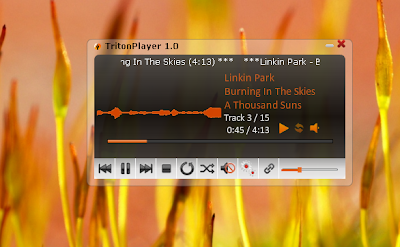
Below is a screen shot of the Compact Mode.


When minimized the player will hide from the task bar and an icon will be displayed in the system tray. Some of the options can be invoked from the system tray menu. When you mouse over the icon, it will show the current track name. Triton Player features 3 types of Visualizations that are based on the sound input from the currently playing file.

Here is a look at the maximized mode.


You can save the playlist as an mpl file which is nothing but a fancy XML file. The player will remember the last browsed directory and the playlist that was used when you start it again. We are working on adding a couple of features at the moment. Explore and find out more.

Check out the version 1.0 from here(Hosted at MediaFire).

P.S. You will need atleast Adobe Air 1.0 Runtime to install and use this player.

Friday, December 03, 2010

Hidden Snake Game on YouTube

Don't know if any of you guys already know this, but there is a hidden Snake Game on th e YouTube player. How to play it? Follow these steps :

1. Open a youtube Video

2. Hold left button of muse + left arrow on keyboard + top arrow on keyboard

Thats it!

If you hit the sides of the video, the game will be over.